
Introduction
Dye sublimation printers have revolutionized the way we think about printing, offering a unique blend of quality and versatility that sets them apart from traditional printing methods. These printers utilize a process that allows dyes to be transferred onto various materials, resulting in vibrant and long-lasting images. As the demand for high-quality prints continues to grow in both personal and professional spheres, understanding dye sublimation printing becomes increasingly important.
This article aims to provide a comprehensive guide for potential buyers and users of dye sublimation printers. Whether you’re a professional photographer looking to produce stunning prints, a business owner in need of reliable branding materials, or a hobbyist eager to explore new printing techniques, this guide will equip you with the knowledge you need to make informed decisions.
What is Dye Sublimation Printing?
Dye sublimation printing is a unique printing technique that uses heat to transfer dye onto materials such as fabric, plastic, or paper. Unlike traditional printing methods that rely on inks being applied to a surface, dye sublimation works by turning solid dye into gas without passing through a liquid state, a process known as sublimation. This allows the dye to penetrate the material, resulting in prints that are vibrant and durable.
The dye sublimation process generally involves three main steps: first, the design is printed onto a special transfer paper using sublimation inks. Next, heat and pressure are applied to the transfer paper, causing the dye to turn into gas and bond with the substrate. Finally, once the heat is removed, the dye solidifies, creating a permanent, high-quality image. This method differs significantly from other printing techniques, such as inkjet or laser printing, which lay ink on top of the surface rather than integrating it into the material.
Advantages of Dye Sublimation Printers
Dye sublimation printers are not just about vibrant colors; they offer a range of advantages that make them an attractive choice for various printing needs. Below, we explore the key benefits of this technology in detail.
Exceptional Print Quality
One of the most significant advantages of dye sublimation printing is its exceptional print quality. Dye sublimation technology produces high-resolution images with a smooth gradient and rich colors. The process allows for a wider color gamut compared to other printing methods, enabling the reproduction of detailed images with accurate color matching. This is particularly important for photographers and graphic designers who require precise color representation in their prints.
Durability and Longevity
Prints created using dye sublimation are known for their durability and resistance to fading. The dye becomes part of the substrate, making it less prone to wear and tear compared to traditional prints. This longevity is especially valuable for items that will be displayed under various lighting conditions or exposed to the elements, such as banners, apparel, and signage. Users can expect their prints to maintain their vibrancy for many years, making dye sublimation a cost-effective choice in the long run.
Versatility in Materials
Dye sublimation printing is highly versatile, allowing for a wide range of substrates to be used. While fabric is a popular choice, dye sublimation can also be applied to materials like ceramics, metal, and even certain plastics. This opens up a world of possibilities for creative projects, enabling users to print on items such as t-shirts, mugs, and promotional products. The adaptability of dye sublimation technology makes it suitable for both personal use and commercial applications.
Types of Dye Sublimation Printers
Desktop Dye Sublimation Printers
Desktop dye sublimation printers are compact devices designed for home or small office environments. These printers are ideal for users who need to create high-quality prints without requiring a large footprint. Typically, they offer a range of features, including wireless connectivity, user-friendly interfaces, and the ability to print directly from smartphones or tablets. Desktop models are perfect for hobbyists, photographers, and small businesses looking to produce custom prints on-demand.
Commercial Dye Sublimation Printers
For businesses that require a higher volume of prints, commercial dye sublimation printers are the way to go. These large-format printers are designed for high-capacity production, enabling users to print on a wide range of materials with exceptional speed and quality. Commercial models often come equipped with advanced features such as automatic cutting, bulk ink systems, and enhanced color management tools. They are widely used in industries such as signage, apparel, and promotional products where efficiency and quality are paramount.
Portable Dye Sublimation Printers
Portable dye sublimation printers are compact, lightweight devices that allow users to print on the go. These printers are designed for convenience, making them ideal for events, trade shows, or travel. While they typically have a smaller printing capacity compared to desktop or commercial models, portable printers still produce high-quality prints and are easy to operate. They offer an excellent solution for photographers and businesses that need to create instant prints for customers or clients.

Key Features to Look for in a Dye Sublimation Printer
When purchasing a dye sublimation printer, understanding the key features is crucial for making an informed decision. Various factors can significantly affect your printing experience and the quality of your prints. Below are the essential features to consider when selecting the right dye sublimation printer for your needs.
Print Speed
Print speed is an important feature to consider, especially depending on your intended use. If you plan to print large batches of items, such as t-shirts for a business, a printer with a higher print speed is essential. Most dye sublimation printers will list their print speeds in terms of pages per minute (PPM) or prints per hour. Understanding your volume needs will help you select a printer that can efficiently handle your workload without causing delays.
For photographers or users who print occasionally, a slightly slower printer may suffice. However, if you often find yourself needing to produce prints quickly for events or exhibitions, investing in a printer with higher speed capabilities may be more beneficial. Always check the manufacturer’s specifications to gauge how well a printer will suit your pace of work.
Print Resolution
The print resolution of a dye sublimation printer is another critical feature that directly affects the quality of the prints. Measured in dots per inch (DPI), resolution determines the level of detail present in your prints. Higher DPI ratings result in sharper, more detailed images, making this an essential consideration for photographers and graphic designers.
For standard applications, a printer with a resolution of around 300 DPI is often sufficient. However, if your projects require fine detail or vibrant color reproduction, look for printers that offer higher resolutions—some models can reach up to 1200 DPI or more. This ensures that every nuance of your artwork or photograph is captured accurately, providing a professional touch to your prints.
Connectivity Options
Connectivity options are essential for seamless integration with your devices. Most modern dye sublimation printers offer a variety of connectivity features, including USB, Wi-Fi, and Bluetooth. Depending on how you plan to use your printer, consider which connectivity options will be most beneficial for your workflow.
- USB: This is a standard connection allowing you to connect directly to a computer. It’s reliable and typically provides fast data transfer.
- Wi-Fi: Wireless connectivity allows for more flexibility, enabling you to print from multiple devices without physical connections. This is particularly useful in office environments or when printing from mobile devices.
- Bluetooth: If you’re looking to print directly from smartphones or tablets, Bluetooth can be a convenient option, especially for portable printers.
Assess your existing devices and how you want to print to ensure you select a printer with the right connectivity options for you.
Setting Up Your Dye Sublimation Printer
Setting up your dye sublimation printer doesn’t have to be a daunting task. Follow these step-by-step instructions to ensure a successful installation and configuration of your printer.
Unboxing and Initial Setup
When you first receive your dye sublimation printer, carefully unbox it and check for all included components. Typically, you should find the printer, power cord, user manual, and starter ink and paper. Before proceeding, place the printer on a stable surface away from direct sunlight and moisture.
After positioning the printer, plug it into a power outlet and turn it on. You may be prompted to go through a basic setup process, which could involve selecting the language and connecting to your Wi-Fi network. Ensure that you have a reliable internet connection, as this will facilitate the installation of necessary software and updates.
Installing Driver Software
Once your printer is powered on and connected, the next step is to install the required driver software. This software is essential for your computer to communicate effectively with the printer.
- Visit the manufacturer’s website and navigate to the support or download section.
- Locate the specific model of your printer and download the latest driver software compatible with your operating system.
- Run the downloaded file and follow the on-screen instructions to complete the installation.
- Restart your computer if prompted, and ensure the printer is connected to your computer via USB or Wi-Fi.
Completing this step ensures that you can access all the printer’s features and settings from your computer.
Loading Sublimation Paper and Inks
With your printer set up and software installed, it’s time to load the sublimation paper and inks. Begin by opening the printer’s ink compartment and gently shaking the ink cartridges to ensure the dye is well mixed.
Next, carefully insert the ink cartridges into their respective slots, following any color-coded instructions provided in the user manual. Once the inks are loaded, you can proceed to load the sublimation paper into the printer. Make sure you are using paper specifically designed for dye sublimation printing, as this will ensure optimal results.
- Open the paper tray and adjust the guides to fit the size of your sublimation paper.
- Place the sublimation paper in the tray, with the printable side facing down.
- Close the tray securely, ensuring the paper is correctly positioned.
After completing these steps, your printer is ready for its first print!
Troubleshooting Common Dye Sublimation Printer Issues
Even with a high-quality dye sublimation printer, you may encounter occasional issues during operation. Here is a comprehensive troubleshooting guide for common problems.
Connectivity Problems
Connectivity issues can be frustrating, but they are often easy to resolve. If you experience problems with your Wi-Fi connection, start by ensuring that your printer is within range of your router. Restart both the printer and the router to refresh the connection.
If you are using a USB connection, check that the cable is securely connected to both the printer and the computer. If the connection is still not recognized, try using a different USB port or cable. Additionally, ensure that the printer is selected as the default printer in your computer’s settings.
Print Quality Issues
Print quality is paramount in dye sublimation printing. If you notice color inaccuracies or resolution problems, start by checking the ink levels. Low ink can affect print quality, so replace any cartridges that are running low.
Another factor to consider is the type of sublimation paper used. Ensure you are using high-quality, compatible sublimation paper. Additionally, check the printer settings to confirm that the correct paper type and print quality settings are selected. Running a print head cleaning cycle can also help if you experience streaks or blurriness in your prints.
Paper Jams and Misfeeds
Paper jams can disrupt your printing process, but they are usually easy to fix. If you encounter a jam, turn off the printer and carefully remove any stuck paper from the feed tray or output tray. Make sure to check for any torn pieces of paper that may be lodged inside the printer.
To prevent future jams, ensure that the paper is correctly loaded and that the guides are adjusted to fit the paper size. Avoid overloading the paper tray, as this can lead to misfeeds. Regularly checking and maintaining the paper path can also help prevent these issues.
Maintenance Tips for Dye Sublimation Printers
Regular Cleaning Procedures
Routine cleaning is crucial for maintaining print quality and prolonging the life of your printer. Start by cleaning the exterior of the printer with a soft, lint-free cloth to remove dust and debris.
Internally, perform print head cleaning regularly, especially if the printer hasn’t been used for a while. Most models have a built-in cleaning function that can be accessed through the printer’s software. Additionally, check and clean any rollers and paper paths that may accumulate dust or residue, as this can affect paper feeding and print quality.
Replacing Consumables
Keeping an eye on your ink and paper levels is vital for uninterrupted printing. Ink cartridges should be replaced when they are nearly empty to avoid print quality issues. Most printers provide alerts when ink levels are low, but it’s good practice to check regularly.
When it comes to sublimation paper, ensure you are stocked up and replace it as needed. Using expired or damaged paper can lead to poor print quality, so always store it in a cool, dry place to maintain its integrity.
Comparing Dye Sublimation Printing to Other Printing Methods
Dye sublimation printing has gained popularity for its vibrant color reproduction and versatility. However, it’s essential to understand how it compares to other printing methods, notably inkjet and laser printing. Each method has its unique features, advantages, and limitations.
Dye Sublimation vs. Inkjet
When comparing dye sublimation to inkjet printing, several key differences emerge that can impact your choice based on your specific needs.
- Print Quality: Dye sublimation printers excel in producing high-quality prints with rich, vibrant colors and smooth gradients. This is particularly true for photographic prints and textiles. In contrast, inkjet printers may struggle with color consistency and can produce visible dot patterns, especially at lower resolutions.
- Cost: The initial cost of dye sublimation printers is typically higher than that of standard inkjet printers. However, the cost per print can be lower in dye sublimation due to the longevity of the prints and the efficiency of the ink usage. Inkjet printers often require more frequent cartridge replacements, which can add up over time.
- Applications: Dye sublimation is widely used in industries requiring high-quality images, such as fashion, home decor, and promotional products. Inkjet printers are more versatile and can handle a broader range of media, making them suitable for general office use, documents, and photos.
In summary, while dye sublimation is ideal for specialized applications requiring vibrant colors and durability, inkjet printers offer versatility and lower initial costs for general printing needs.
Dye Sublimation vs. Laser Printing
Comparing dye sublimation to laser printing reveals different advantages and disadvantages, particularly in terms of technology and output.
- Print Quality: Dye sublimation produces superior prints with smooth color transitions, making it the preferred choice for high-quality photographs and textiles. Laser printers, while capable of producing sharp text and graphics, may not achieve the same color depth and vibrancy as dye sublimation, especially for photographic images.
- Speed: Laser printers are typically faster than dye sublimation printers, making them more suitable for high-volume printing tasks, such as office documents. If speed is a critical factor, laser technology may be the better option.
- Durability: Prints from dye sublimation resist fading and are often water-resistant, making them ideal for items that will be handled frequently, like apparel and promotional items. Laser prints can be durable as well, but they may not match the longevity and color fidelity of dye sublimation prints.
Ultimately, the choice between dye sublimation and laser printing depends on your specific needs, whether you prioritize print quality, speed, or durability.
Creative Applications of Dye Sublimation Printing
Dye sublimation printing has established its footprint in diverse industries, thanks to its ability to produce high-quality and durable prints. Let’s explore some of the creative applications where this technology shines.
Fashion and Apparel
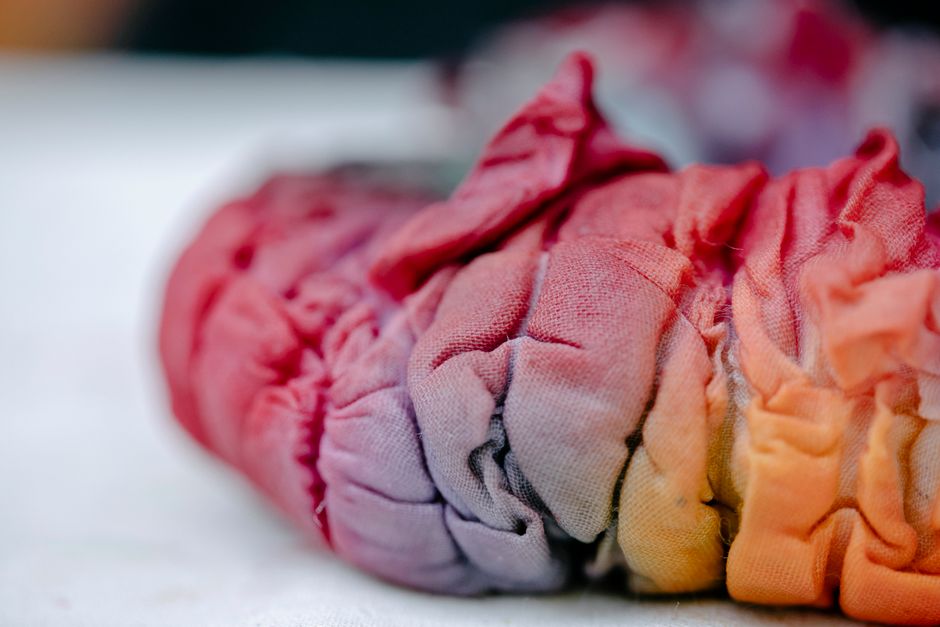
Dye sublimation has revolutionized the fashion industry by allowing designers to create custom clothing and accessories. This method enables intricate designs and patterns to be printed directly onto fabrics, providing vivid colors and designs that are resistant to fading.
From t-shirts to leggings, the possibilities are endless. Fashion brands can experiment with unique graphics and patterns that stand out in the market. Additionally, dye sublimation allows for smaller production runs, making it easier for designers to offer limited edition pieces without incurring heavy costs.
Home Decor
In home decor, dye sublimation is used to create personalized items such as cushions, curtains, and wall art. This printing method allows for customization, enabling homeowners to express their individual styles through personalized designs.
Whether it’s a family photo on a throw pillow or custom artwork on a tapestry, dye sublimation provides the flexibility and quality needed to make home decor unique and appealing. The durability of the prints ensures that these items remain vibrant and maintain their quality over time.
Promotional Products
Businesses utilize dye sublimation to create promotional products that effectively market their brand. From custom mugs and coasters to banners and tote bags, the possibilities are vast.
Dye sublimation allows companies to print high-resolution images and logos, ensuring that their branding is represented accurately and attractively. This method also enables businesses to produce items in small batches, allowing for more targeted marketing campaigns and unique giveaways.
Conclusion
Dye sublimation printing stands out as a powerful technology in the printing landscape, offering unparalleled print quality and durability. Its ability to produce vibrant colors and detailed images makes it ideal for various applications, from fashion to promotional products.
When considering a dye sublimation printer, weigh your specific needs, whether it’s print quality, production volume, or application type. Additionally, regular maintenance and proper usage will ensure the best results from your dye sublimation printer.
FAQs
How long do dye sublimation prints last?
Dye sublimation prints can last for many years without fading, especially when printed on materials designed for this technology. When stored and displayed properly, these prints can maintain their vibrancy and quality for a long time.
Can I use any type of paper with dye sublimation printers?
No, it is essential to use paper specifically designed for dye sublimation printing. This specialized paper is coated to accept dye and facilitate the sublimation process, ensuring optimal quality and results.
What is the difference between dye sublimation and heat transfer printing?
The primary difference lies in the process. Dye sublimation involves turning solid dye into gas to bond with the substrate, resulting in vibrant, long-lasting images. In contrast, heat transfer printing uses heat to transfer ink from a carrier paper onto the substrate, which can lead to a heavier feel and less durability compared to dye sublimation prints.